Thermo Jet Printer Introduces a Portable Inkless Printing Option for On-the-Go Document Needs
NxtGizmo's wireless thermal printer uses heat-activated 8.5 x 11-inch paper and 300 DPI output to offer a compact, ink-free printing solution for mobile professionals and everyday users.
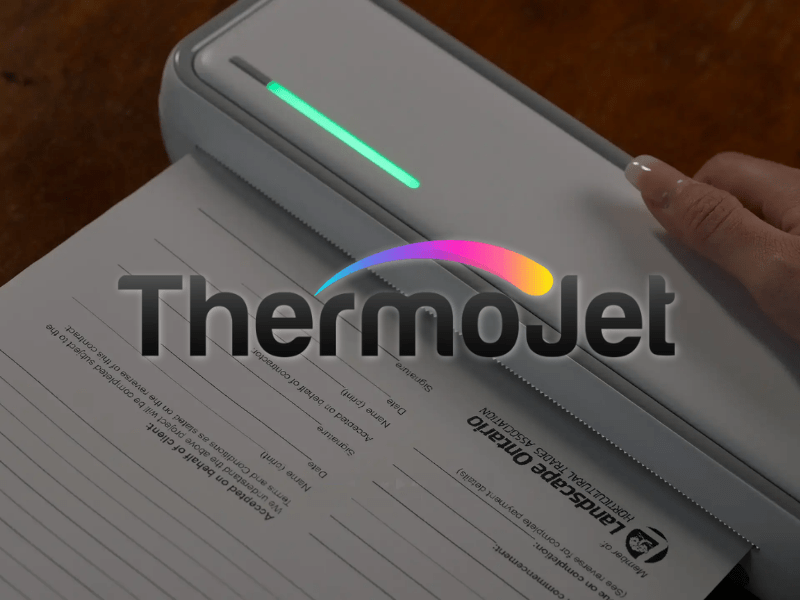
CHICAGO, December 9, 2025 (Newswire.com) - This content is for informational purposes only and does not constitute financial, legal, or professional advice. All product details, features, specifications, and pricing are sourced from publicly available information and the official product page as of December 2025. Pricing is subject to change without notice. Individual experiences may vary based on usage patterns, environmental conditions, and specific applications. This article contains affiliate links, and purchases made through these links may result in commission compensation. Verify all details, including current pricing, shipping information, return policies, and usage guidelines, on the official website before purchase.
Thermo Jet Printer Review: The Inkless Wireless Portable Printer Changing How People Print On The Go
TLDR Summary: The Thermo Jet Printer is a portable thermal printer that uses heat-activated paper instead of ink cartridges. Manufactured by NxtGizmo, the device connects via Bluetooth to iOS, Android, and Windows devices, prints at 300 DPI resolution on 8.5 x 11-inch thermal paper, and weighs under two pounds. The battery supports up to 1.5 hours of continuous printing per charge and USB-C charging. The device is designed for users seeking a portable printing option that does not require ink cartridges. Thermal printing differs from inkjet printing in several ways, each of which may be relevant depending on individual needs and usage patterns. Pricing starts at $99 per unit as of December 2025, with multi-unit options available. A 90-day money-back guarantee is included. Those seeking additional information can visit the Official Thermo Jet Printer Site.
In This Release, You Will Find:
An overview of the Thermo Jet Printer and how thermal printing technology functions
A breakdown of the device's stated features, including resolution, connectivity, and battery specifications
Considerations for how this portable thermal printer compares to other printing methods
Set up instructions and a suggested integration timeline
Pricing tiers and factors users may wish to consider when evaluating costs
Information about which users may find this device suitable and which may prefer alternatives
What the Product Is
The Thermo Jet Printer is a portable thermal printer designed for document printing without ink cartridges. NxtGizmo manufactures the device and uses thermal printing technology to produce output on specially coated thermal paper.
Thermal printing functions by applying heat to paper with a heat-sensitive coating. When the thermal print head heats specific areas of the paper, the coating reacts and darkens, forming text or images. This technology has been used in receipt printers, shipping label systems, and other applications for several decades.
The Thermo Jet is designed to print on 8.5 x 11-inch letter-size thermal paper. According to the manufacturer, users can print documents, spreadsheets, images, labels, tickets, forms, study materials, recipes, and stencils. The device prints in black and white only, as color output is not possible with thermal printing technology.
The device weighs under two pounds and is designed for portability. It connects to smartphones, tablets, and laptops via Bluetooth, with a free companion app available for iOS and Android platforms. The manufacturer states that no driver installation is required.
Thermal printing differs from inkjet printing in that it does not use liquid ink or cartridges. Instead, thermal paper serves as the sole consumable. Users considering this device should note that standard copy paper cannot be used-only thermal paper compatible with the device will produce output.
Those seeking additional information can visit the Official Thermo Jet Printer Site.
Main Features and Functions
The following features are listed by the manufacturer for the Thermo Jet Printer. Users should verify current specifications through the official product page.
Thermal Printing Technology
The Thermo Jet uses thermal printing, which produces output through heat rather than ink. The thermal print head contains heating elements that activate the coating on thermal paper to create text and images. This method does not require ink cartridges, toner, or liquid consumables.
Users should note that thermal printing requires the purchase of thermal paper as an ongoing consumable. The cost and availability of thermal paper may vary by supplier and location.
300 DPI Print Resolution
The manufacturer states that the Thermo Jet prints at 300 dots per inch. This resolution is commonly used for document printing and is generally considered suitable for text-heavy materials, forms, and basic graphics.
The device produces monochrome output only. Users requiring color printing will need to consider alternative solutions.
Bluetooth Connectivity
The Thermo Jet connects to devices via Bluetooth. A free companion app is available for iOS and Android platforms to facilitate printing. The manufacturer states that no driver installation or software CDs are required.
Compatibility is stated for iOS, Android, and Windows laptops with Bluetooth. Users should verify compatibility with their specific devices.
Portable Design
The device weighs under two pounds according to the manufacturer. This weight is intended to allow transport in bags, backpacks, or briefcases.
Battery Specifications
The manufacturer states the battery supports up to 1.5 hours of continuous printing on a single charge. Recharging is handled through a USB-C port, with the manufacturer indicating a recharge time of approximately three to four hours.
Actual battery performance may vary based on usage patterns, environmental conditions, and battery age.
Paper Size
The Thermo Jet accepts 8.5 x 11-inch letter-size thermal paper. Legal size, tabloid, and other paper formats are not supported.
Why This Product Leads Its Market Category
Understanding why the Thermo Jet Printer stands out requires examining the problems users face with traditional printing solutions and how portable thermal technology addresses each one. The market for compact, wireless printers has expanded significantly as remote work, mobile professionals, and on-the-go lifestyles have become standard. Within this landscape, the Thermo Jet occupies a specific position that differentiates it from both traditional inkjet printers and other portable printing options.
The Ink Cartridge Problem
Anyone who has owned an inkjet printer understands the cartridge frustration. Ink runs out at inconvenient times, often mid-document. Replacement cartridges cost anywhere from twenty to fifty dollars each, and many printers require multiple cartridges for full functionality. Worse, ink dries out when printers sit unused for extended periods, rendering expensive cartridges useless even when they still contain liquid.
The economics compound over time. Industry analyses have repeatedly shown that inkjet ink ranks among the most expensive liquids by volume, often exceeding the per-ounce cost of premium champagne or perfume. Users who print moderately may spend hundreds of dollars annually on cartridges alone, frequently exceeding the original cost of the printer within the first year or two of ownership.
The Thermo Jet eliminates cartridges entirely. Users purchase thermal paper, which does not dry out, does not clog print heads, and does not require priming cycles that waste ink. While thermal paper represents an ongoing consumable cost, the economics typically favor thermal printing for users with moderate document printing needs.
Driver and Software Complications
Traditional printers require driver software that facilitates communication between the computer and printer hardware. These drivers must be downloaded, installed, updated, and troubleshot when problems arise. Operating system updates frequently break printer compatibility, requiring users to search for updated drivers or contact manufacturer support.
Wireless network printers add another layer of complexity. Users must configure network settings, ensure the printer and computer share the same network, troubleshoot IP address conflicts, and manage print queues that sometimes stall or corrupt. The phrase "printer not found" has become a universal source of frustration for computer users worldwide.
The Thermo Jet bypasses this entire ecosystem. Bluetooth connectivity paired with a dedicated app means there are no drivers to install, no network configurations to manage, and no compatibility issues to troubleshoot. The setup process takes seconds rather than hours, and the connection remains stable without the intermittent failures common with network printers.
Bulk and Portability Limitations
Standard home and office printers were designed for stationary use. They occupy permanent desk space, require proximity to power outlets, and weigh enough that moving them becomes an event rather than a casual decision. For users with limited space, this footprint represents a significant inconvenience.
More critically, traditional printers cannot travel. Professionals who need to print documents in the field, at client sites, or during travel must rely on hotel business centers, print shops, or colleagues with printer access. This dependency creates delays, compromises confidentiality, and adds costs.
The Thermo Jet weighs under two pounds and fits in a bag. Users can print anywhere-in vehicles, at client locations, in hotel rooms, at coffee shops, or anywhere else work happens. This portability transforms printing from a location-dependent task into a capability that travels with the user.
Comparison With Other Portable Printers
The portable printer market includes several categories, and understanding where the Thermo Jet fits helps users evaluate whether it meets their specific needs.
Portable inkjet printers like the HP OfficeJet 200 and Canon PIXMA TR160 offer color printing and familiar inkjet technology in smaller form factors. However, they still require ink cartridges, which means users incur the same consumable costs and the same potential for dried ink as with traditional printers. These devices are also bulkier and heavier than thermal alternatives.
Compact thermal printers from brands like Brother (PocketJet series) and Phomemo offer similar inkless technology. The Brother PocketJet has established itself in professional markets, including healthcare, field service, and public safety. However, these devices often carry higher price points, sometimes exceeding $300 for the printer alone.
The Thermo Jet positions itself as an accessible entry point into portable thermal printing with promotional pricing that undercuts many competitors. The 90-day money-back guarantee reduces purchase risk, allowing users to evaluate whether thermal printing fits their workflow before committing long-term.
Print Quality Considerations
At 300 DPI, the Thermo Jet delivers resolution appropriate for document printing, forms, labels, and text-heavy materials. This matches the output quality of most standard office printers for typical business documents.
Users should understand that thermal printing involves tradeoffs. Prints are monochrome only-no color output is possible. For users who primarily print text documents, forms, contracts, and similar materials, this limitation rarely matters. For users requiring color photographs, marketing brochures, or graphic design output, thermal printing is not the appropriate technology.
Additionally, thermal prints can fade over time if exposed to heat, direct sunlight, or certain environmental conditions. For archival documents requiring permanent retention, users may want to consider whether thermal output meets their longevity requirements. For everyday documents, receipts, forms, and working materials, the print durability is typically sufficient.
The Simplicity Factor
Beyond specifications and features, the Thermo Jet appeals to users who value simplicity. The device works immediately out of the box. There is no learning curve, no technical configuration, and no ongoing maintenance beyond loading paper and recharging the battery.
For users who have struggled with printers in the past-dealing with paper jams, ink smears, driver errors, and network connectivity issues-this simplicity represents genuine value. The Thermo Jet does one thing well: it prints documents reliably, portably, and without complications.
This focus on core functionality rather than feature expansion distinguishes the product from multifunction devices that attempt to combine printing, scanning, copying, and faxing into single units. Those devices serve users who need all functions, but they add complexity and bulk that many users neither need nor want.
Market Position Summary
The Thermo Jet Printer occupies a specific market position: affordable portable thermal printing for users who prioritize simplicity, portability, and freedom from ink cartridges over color output and multifunction capabilities. It competes effectively against both traditional inkjet printers (on portability and consumable costs) and premium portable thermal printers (on price accessibility).
Users whose printing needs align with these priorities-document-focused, portability-valued, simplicity-preferred-will find the Thermo Jet a compelling option. Users requiring color output, scanning functionality, or archival-grade permanence should evaluate alternative solutions.
Setup and Integration Guide
The following setup instructions are based on information provided by the manufacturer. Users should consult the documentation included with their device for specific guidance.
Step 1: Unboxing and Inspection
Upon receiving the Thermo Jet, remove the device from the packaging and verify all components are present. The package typically includes the printer unit, a USB-C charging cable, starter thermal paper, and documentation.
Inspect the device for any shipping damage before proceeding with setup. Remove any protective packaging materials, tape, or inserts included for shipping protection.
Step 2: Initial Charging
The manufacturer recommends charging the device before first use. Connect the included USB-C cable to the charging port and plug into a USB power source such as a wall adapter or laptop USB port.
The manufacturer states that a full charge takes approximately three to four hours. The device's indicator lights typically show charging status, with specific details in the included documentation.
Step 3: Download the Companion App
The Thermo Jet uses a free companion app for printing. The app is available for iOS devices through the Apple App Store and for Android devices through the Google Play Store.
Download and install the app, granting necessary permissions for Bluetooth connectivity when prompted.
Step 4: Bluetooth Pairing
Enable Bluetooth on your mobile device through the device settings menu. Power on the Thermo Jet using the main power button.
Open the companion app and follow the on-screen instructions to pair with the Thermo Jet. The app should scan for available devices within Bluetooth range. Select the Thermo Jet from the list to initiate pairing.
Once paired, the devices should reconnect automatically whenever both are powered on and within range.
Step 5: Loading Thermal Paper
Open the paper compartment as instructed in the device's instructions. Thermal paper has a coated side and an uncoated side. The coated side must face the print head for proper printing.
Insert the thermal paper into the paper compartment, following the alignment guides. Close the compartment securely.
If prints appear blank, the paper may be loaded with the incorrect side facing the print head. Remove and reload with the opposite side facing up.
Step 6: Test Printing
Send a test print to verify the setup is complete. Open the companion app, select a document, and initiate printing.
Examine the output for quality and alignment. If issues arise, consult the app's troubleshooting section or the included documentation.
Printing From Laptops
On Windows laptops with Bluetooth, open Bluetooth settings and pair with the Thermo Jet using standard pairing procedures. The specific process may vary depending on the operating system version.
Troubleshooting Considerations
Common setup issues and potential solutions include:
Bluetooth connection not establishing: Ensure the Thermo Jet is powered on. Move devices closer together. Restart both devices if needed.
Suggested Integration Timeline
The following timeline provides a framework for evaluating the Thermo Jet over the 90-day guarantee period. Individual timelines may vary based on usage patterns and needs.
Days 1-30: Initial Evaluation
During the first month, focus on becoming familiar with basic device operation. Print various document types to understand how the device handles different content. Establish where the device will be stored when not in use.
Identify which printing tasks you intend to use the Thermo Jet for going forward. Test whether the output meets your requirements for each intended use case.
Research thermal paper suppliers and pricing. The starter paper included with the device will be consumed during initial testing, and users should establish a supply source before running out.
Note any limitations or issues that arise during initial use.
Days 31-60: Extended Evaluation
During the second month, continue using the device for its intended applications. Evaluate whether it meets your needs under regular use conditions.
Track paper consumption to understand ongoing supply requirements. Establish a battery management routine based on your usage patterns.
Identify any friction points or limitations that have emerged. Determine whether these are acceptable for your use case.
Days 61-90: Final Assessment
During the third month, make a final assessment of whether the device meets your needs.
Consider whether Thermo Jet adequately addresses your intended use cases. Note any limitations that affect your workflow.
The 90-day money-back guarantee window closes at the end of this period. Users who determine that the device does not meet their needs should initiate a return before the guarantee expires. Specific return procedures should be confirmed through the official website or customer service.
Users who choose to keep the device should establish sustainable supply routines for thermal paper based on observed consumption patterns.
Safety and Usage Guidelines
The following guidelines are provided for general reference. Users should consult the documentation included with their device for specific safety information.
Thermal Paper Storage
Thermal paper contains a coating that reacts to heat. Store paper in a superb, dry location away from direct sunlight and heat sources. Exposure to heat or sunlight may cause the coating to activate prematurely, potentially affecting paper quality.
Humidity may cause paper to curl or feed improperly. In humid environments, consider storing paper in sealed containers.
Handle paper by the edges when possible to minimize contact with the coated surface.
Print Longevity Considerations
Thermal prints may fade over time under certain conditions. Factors that may affect print longevity include exposure to heat, direct sunlight, humidity, and certain chemicals.
The rate and extent of potential fading vary based on storage conditions and environmental factors. Users with requirements for long-term document retention should research thermal print longevity characteristics and determine whether they meet specific needs.
For documents where permanence is a priority, users may wish to consider alternative printing methods or create backup copies using other technologies.
Battery Care
The manufacturer recommends standard lithium battery care practices. Avoid fully depleting the battery before recharging when possible. Disconnect from charging once fully charged.
Use appropriate USB power sources rated for device charging. Avoid charging in extreme temperatures.
If storing the device for extended periods, the manufacturer suggests maintaining a partial charge rather than storing fully charged or fully depleted.
Device Maintenance
The thermal print head may accumulate dust or debris over time. If print quality degrades, cleaning the print head with a soft, lint-free cloth may help improve it. Allow the print head to dry completely before use.
Keep the paper feed mechanism clear of debris. The device exterior can be cleaned with a slightly damp cloth, avoiding moisture entry into ports or openings.
Usage Limitations
The Thermo Jet prints only in black and white. Color output is not possible.
The device requires thermal paper. Standard copy paper, inkjet paper, and other non-thermal media will not produce output.
The device is a printer only. It does not include scanning, copying, or fax functionality.
The maximum supported paper size is 8.5 x 11 inches.
The thermal print head reaches high temperatures during operation. Avoid touching the print head immediately after printing.
Cost and Value Considerations
The following pricing information is based on the manufacturer's website as of December 2025. Pricing is subject to change without notice. Users should verify current pricing through the official website before purchase.
Current Pricing Tiers
NxtGizmo offers the Thermo Jet through a tiered pricing structure. Three purchasing options are listed as of December 2025:
Single Unit (1x Thermo Jet)
Listed Price: $99.00 per unit Manufacturer's Stated Original Price: $198.00 Manufacturer's Stated Discount: 50% off
Two-Unit Bundle (2x Thermo Jet)
Listed Price: $89.99 per unit ($179.98 total) Manufacturer's Stated Original Price: $399.96 Manufacturer's Stated Discount: 55% off This option is labeled "Most Popular" by the manufacturer.
Four-Unit Bundle (4x Thermo Jet)
Listed Price: $79.99 per unit ($319.96 total) Manufacturer's Stated Original Price: $914.16 Manufacturer's Stated Discount: 65% off
Users should note that the manufacturer states the original prices and discount percentages. Actual market pricing for comparable products varies, and users may wish to research alternatives before purchase.
Ongoing Consumable Costs
The Thermo Jet requires thermal paper as an ongoing consumable. Standard copy paper cannot be used with this device.
Thermal paper pricing varies based on supplier, quantity purchased, and geographic location. Users considering this device may wish to research current thermal paper pricing from local suppliers to estimate ongoing costs based on their anticipated usage.
Comparison to Other Printing Methods
The cost structure of thermal printing differs from that of inkjet and laser printing. Each method involves different consumables and usage characteristics. The relative cost-effectiveness depends on individual circumstances, including print volume, usage frequency, and local pricing for consumables.
Inkjet printers use ink cartridges as consumables. Cartridge pricing, page yield, and replacement frequency vary by printer model and usage patterns.
Laser printers use toner cartridges, which have different cost characteristics than inkjet cartridges.
Thermal printers use thermal paper as the consumable instead of ink or toner.
Users considering the Thermo Jet may wish to calculate their current printing costs and compare them to estimated thermal paper costs based on anticipated usage. However, such calculations involve variables that differ for each user, and outcomes cannot be predicted with certainty.
Factors users may wish to consider include:
Current consumable spending on existing printing methods. Anticipated print volume with the Thermo Jet Local pricing for thermal paper in appropriate quantities. Usage patterns (frequent vs. infrequent printing). Whether portability and other features are relevant to specific needs
90-Day Money-Back Guarantee
The manufacturer states that the Thermo Jet includes a 90-day money-back guarantee. This policy allows users to evaluate the device and return it within the said period if it does not meet their needs.
Specific terms and conditions of the guarantee, including any requirements regarding product condition or return procedures, should be confirmed through the official website or customer service before purchase.
Users who are unsure whether the Thermo Jet meets their needs may wish to use this evaluation period to test the device under actual usage conditions before making a final decision.
Shipping Information
The manufacturer states that orders ship from the United States. Shipping costs, delivery timeframes, and available shipping methods may vary based on destination and selected options.
Users should review shipping details during the ordering process to understand total costs, including delivery.
International shipping availability and any applicable customs considerations should be verified through the official website for customers outside the United States.
Factors to Consider When Evaluating Cost
When evaluating whether the Thermo Jet represents an appropriate purchase, users may wish to consider:
Whether the device's capabilities match their printing needs, whether the limitations (monochrome only, thermal paper required, no scanning/copying) are acceptable for their use case. Whether portability is relevant to their situation, Current and anticipated printing costs under their existing setup, Local availability and pricing of thermal paper, and whether the 90-day guarantee period provides sufficient time to evaluate the device.e
Cost-effectiveness is subjective and depends on individual circumstances. Users should evaluate based on their specific needs and situation rather than general assumptions.
Who This Product May Suit
The following descriptions outline user categories that may find the Thermo Jet relevant to their needs, as well as categories that may prefer alternative solutions. Individual suitability depends on specific circumstances and requirements.
Users Who May Find This Device Relevant
Users Seeking Portable Printing
The Thermo Jet is designed for portability, weighing under 2 pounds and operating on batteries. Users who need to print documents at multiple locations or while traveling may find this relevant.
Examples may include professionals who work at client sites, frequent travelers, or those who need printing capabilities outside a traditional office setting.
Users Who Print Primarily Text Documents
The Thermo Jet prints at 300 DPI in black and white. Users whose printing consists primarily of text documents, forms, labels, or similar materials may find this resolution and output type suitable.
Users Seeking an Alternative to Inkjet Consumables
The Thermo Jet uses thermal paper instead of ink cartridges. Users who prefer this consumable model may find it relevant to their needs. Whether this represents an advantage depends on individual circumstances, including usage patterns and local pricing for consumables.
Users With Limited Space
The compact size may be relevant for users with limited desk or storage space. The device can be stored in drawers or bags when not in use.
Users Who Prefer Simple Setup
The manufacturer states that no driver installation is required. Users who prefer a Bluetooth-based setup without software installation may find this relevant.
Users Who May Prefer Alternative Solutions
Users Requiring Color Printing
The Thermo Jet prints only in black and white. Users who need color output for photographs, graphics, presentations, or other materials will need alternative solutions.
Users Requiring Scanning or Copying
The Thermo Jet is a printer only. Users who need scanning, copying, or fax functionality will need separate equipment or a multifunction device.
Users With High-Volume Printing Needs
Users who regularly print large volumes of documents may wish to evaluate whether thermal printing is cost-effective compared to other methods. High-volume requirements may also benefit from features the Thermo Jet does not include, such as high-capacity paper handling.
Users Requiring Long-Term Document Permanence
Thermal prints may fade under certain environmental conditions over time. Users with archival requirements or needs for long-term document permanence should research thermal print longevity characteristics and determine whether they meet specific needs.
Users Unable to Source Thermal Paper Conveniently
The device requires thermal paper, which may not be available at all retailers. Users in locations with limited access to thermal paper supplies should verify availability before purchase.
Users Who Need Large-Format Printing
The maximum supported paper size is 8.5 x 11 inches. Users requiring legal size, tabloid, or other larger formats will need alternative solutions.
Determining Suitability
Users should evaluate whether the Thermo Jet's capabilities align with their specific needs and whether its limitations are acceptable for their intended use cases. The 90-day money-back guarantee allows you to test the device under real-world conditions.
For current product information and specifications, visit the Official Thermo Jet Printer Site.
Frequently Asked Questions
The following questions and answers address common inquiries about the Thermo Jet Printer. Information is based on manufacturer-provided details and should be verified through the official website or product documentation.
How does the Thermo Jet print without ink?
The Thermo Jet uses thermal printing technology. The device contains a thermal print head with heating elements that selectively heat areas of specially coated thermal paper. When heated, the coating on the paper darkens to form text and images.
This technology does not use liquid ink, toner, or cartridges. Thermal paper serves as the consumable required for printing.
What type of paper does the Thermo Jet require?
The device requires thermal paper designed for thermal printing. Standard copy paper, inkjet paper, cardstock, and other non-thermal media will not produce output.
The Thermo Jet accepts 8.5 x 11-inch letter-size thermal paper. Users should verify that the purchased paper is compatible with thermal printers and is the correct size.
Thermal paper is available from office supply retailers, online marketplaces, and specialty suppliers. Pricing and availability vary by location and supplier.
What devices are compatible with the Thermo Jet?
The manufacturer states compatibility with iOS devices (iPhone, iPad), Android smartphones and tablets, and Windows laptops with Bluetooth capability.
Connection is managed through a free companion app available for iOS and Android. Users should verify compatibility with their specific devices before purchase.
Devices without Bluetooth cannot connect to the Thermo Jet, as Bluetooth is the sole connectivity method for printing.
How long does the battery last?
The manufacturer states that the battery supports up to 1.5 hours of continuous printing on a single charge. Actual battery performance may vary based on usage patterns, environmental conditions, print content, and battery age.
Typical usage involving intermittent printing rather than continuous operation may result in different effective runtime between charges.
What is the recharge time?
The manufacturer states that recharging takes approximately three to four hours through the USB-C port. The device accepts standard USB charging from wall adapters, laptop ports, or portable power banks.
What is the print resolution?
The manufacturer states that the Thermo Jet prints at 300 DPI (dots per inch). This resolution is commonly used for document printing.
All output is monochrome (black-and-white). Color printing is not possible with thermal technology.
Can the Thermo Jet print photographs?
The device can print images, but users should consider the following limitations:
All output is black and white. Color images will be converted to grayscale.
The 300 DPI resolution is designed for document printing and may not meet expectations for photographic detail.
Thermal prints may fade over time under certain conditions, affecting their suitability for photograph preservation.
Users with photography printing needs may wish to evaluate whether these characteristics meet their requirements.
What paper sizes are supported?
The Thermo Jet supports only 8.5 x 11-inch letter-size paper. Legal size (8.5 x 14 inches), tabloid (11 x 17 inches), and other formats are not supported.
Does the Thermo Jet scan or copy documents?
No. The Thermo Jet is a printer only. It does not include scanning, copying, or fax functionality.
How do I connect the Thermo Jet to my device?
The general connection process involves:
Charging the Thermo Jet and powering it on
Downloading the free companion app from the Apple App Store or Google Play Store
Enabling Bluetooth on your mobile device
Opening the app and following the on-screen instructions to pair with the printer
Specific pairing procedures may vary. Consult the included documentation for detailed instructions.
Does the Thermo Jet require driver installation?
The manufacturer states that no driver installation is required. The companion app handles communication between devices via Bluetooth.
For laptop printing, standard Bluetooth pairing procedures apply. The specific process may vary by operating system.
What is the return policy?
The manufacturer states that the Thermo Jet includes a 90-day money-back guarantee. This allows users to evaluate the device and return it within the indicated period.
Specific terms, conditions, and return procedures should be confirmed through the official website or customer service before purchase.
Where do orders ship from?
The manufacturer states that orders ship from the United States. Shipping costs, delivery timeframes, and methods vary based on destination and selected options.
International shipping availability should be verified through the official website.
How long do thermal prints last?
Thermal print longevity depends on storage conditions and environmental factors. Exposure to heat, direct sunlight, humidity, and certain chemicals may cause prints to fade over time.
The rate and extent of potential fading vary. Users with long-term retention requirements should research thermal print characteristics under their expected storage conditions.
Can I print double-sided?
The Thermo Jet prints on one side of the paper at a time. Automatic duplex (double-sided) printing is not available. Users requiring double-sided output would need to reload and print the second side manually.
Does the Thermo Jet work without an internet connection?
The Thermo Jet connects directly to paired devices via Bluetooth. Printing does not require internet connectivity once the device is set up.
The companion app may require internet access for initial download and updates.
What file types can be printed?
The companion app supports common file types, including PDFs and images. Specific supported formats may vary by app version and device operating system.
PDF format generally provides consistent results across devices. Users should test their specific file types and applications during the evaluation period.
Is thermal paper expensive?
Thermal paper pricing varies by supplier, quantity, quality, and geographic location. Users should research current pricing from available suppliers to estimate costs based on their anticipated usage.
Direct cost comparisons to other printing methods depend on individual circumstances, including print volume and local pricing for various consumables.
How should thermal paper be stored?
Store thermal paper in a superb, dry location away from heat sources and direct sunlight. Heat or light exposure may prematurely activate the coating.
In humid environments, consider storing paper in sealed containers to prevent moisture absorption.
What happens if I load regular paper?
Standard copy paper will not produce output in the Thermo Jet. The thermal printing process requires heat-sensitive coated paper to function.
Only thermal paper compatible with the device will produce printed output.
Is the Thermo Jet suitable for business use?
Suitability for business use depends on specific requirements. Users should evaluate whether the device's capabilities (portable, monochrome document printing) and limitations (no color, no scanning, thermal paper required) align with their business needs.
The 90-day money-back guarantee allows you to evaluate the device under actual business conditions.
Conclusion
The Thermo Jet Printer is a portable thermal printer manufactured by NxtGizmo that uses heat-activated paper instead of ink cartridges. The device is designed for users seeking a portable document printing option with Bluetooth connectivity.
Key specifications include 300 DPI print resolution, compatibility with iOS, Android, and Windows devices, up to 1.5 hours of continuous printing, USB-C charging, and support for 8.5 x 11-inch letter-size thermal paper. The device weighs under two pounds.
The Thermo Jet has defined limitations that users should consider. The device prints only in black and white. It requires thermal paper and cannot use standard copy paper. It does not include scanning, copying, or fax functionality. Thermal prints may fade over time under certain environmental conditions.
Pricing starts at $99 per unit as of December 2025, with multi-unit bundles available at reduced per-unit pricing. The manufacturer states that a 90-day money-back guarantee is included, allowing users to evaluate the device and return it within that period if it does not meet their needs. Pricing and policies are subject to change.
Users considering the Thermo Jet should evaluate whether its capabilities align with their specific printing requirements and whether its limitations are acceptable for their intended use cases. Factors to consider include printing needs (document types, color requirements, volume), portability requirements, thermal paper availability and pricing in their area, and whether the device's features address their specific situation.
The 90-day guarantee period allows you to test the device under actual conditions before making a final decision. Users who are uncertain about suitability may wish to use this evaluation period rather than relying solely on product descriptions.
This article provides an overview of the Thermo Jet Printer, including its stated features, setup procedures, usage guidelines, pricing information, and considerations for evaluating suitability. Information is based on manufacturer-provided details and publicly available sources as of December 2025.
Users seeking additional information, current pricing, or to verify specifications should consult the official product page. Current details are available at the Official Thermo Jet Printer Site.
Contact Information
For questions, product support, or inquiries related to the Thermo Jet Printer, users may contact the manufacturer using the details below. Availability and response times may vary based on volume and operating hours.
Company: Thermo Jet
Email: cs@nxtgizmo.com
Phone (U.S.): 1-888-803-3564
Hours of Operation: 9:00 a.m. - 5:00 p.m. (local business hours)
Disclaimer
This content is for informational purposes only and does not constitute financial, legal, medical, or professional advice of any kind.
All product details, features, specifications, pricing, and policies referenced in this article are sourced from publicly available information and the manufacturer's website as of December 2025. This information is subject to change without notice. Users should verify all details through the official website before making purchasing decisions.
No guarantees or warranties are made regarding product performance, reliability, durability, cost outcomes, print longevity, suitability for any particular purpose, or any other aspect of the product. Individual experiences and results may vary based on usage patterns, environmental conditions, specific applications, and other factors.
Thermal printing technology has inherent characteristics and limitations. Thermal prints may fade over time under certain conditions, including exposure to heat, sunlight, humidity, or certain chemicals. The rate and extent of any fading depend on storage and environmental factors that vary by situation. Users with archival, long-term retention, or permanence requirements should independently research thermal print longevity characteristics.
The device prints in black and white only and requires thermal paper as a consumable. Standard copy paper is not compatible. The device does not include scanning, copying, or fax functionality. The maximum supported paper size is 8.5 x 11 inches.
Pricing information reflects manufacturer listings as of December 2025 and is subject to change. The manufacturer states that it provides original prices, discounts, and promotional offers. Users should verify current pricing before purchase. Ongoing consumable costs (thermal paper) vary by supplier, quantity, and location.
The referenced 90-day money-back guarantee is subject to the manufacturer's terms and conditions. Users should confirm the guarantee terms, return procedures, and any applicable requirements on the official website or with customer service before purchase.
Comparisons with other printing methods (inkjet, laser, other thermal printers) are provided for general consideration only. Relative cost-effectiveness, suitability, and performance depend on individual circumstances, including usage patterns, print volume, local consumable pricing, and specific requirements. Users should evaluate alternatives based on their own needs and conduct independent research as appropriate.
The publisher of this article has made every effort to ensure accuracy at the time of publication. We do not accept responsibility for errors, omissions, or outcomes resulting from the use of the information provided. Readers are encouraged to verify all details directly with the official source before making a purchase decision.
This article does not represent endorsement by any third party. Brand names and product names mentioned are trademarks of their respective owners.
This article contains affiliate links. If you purchase through these links, a commission may be earned at no additional cost to you.
Source: Thermo Jet